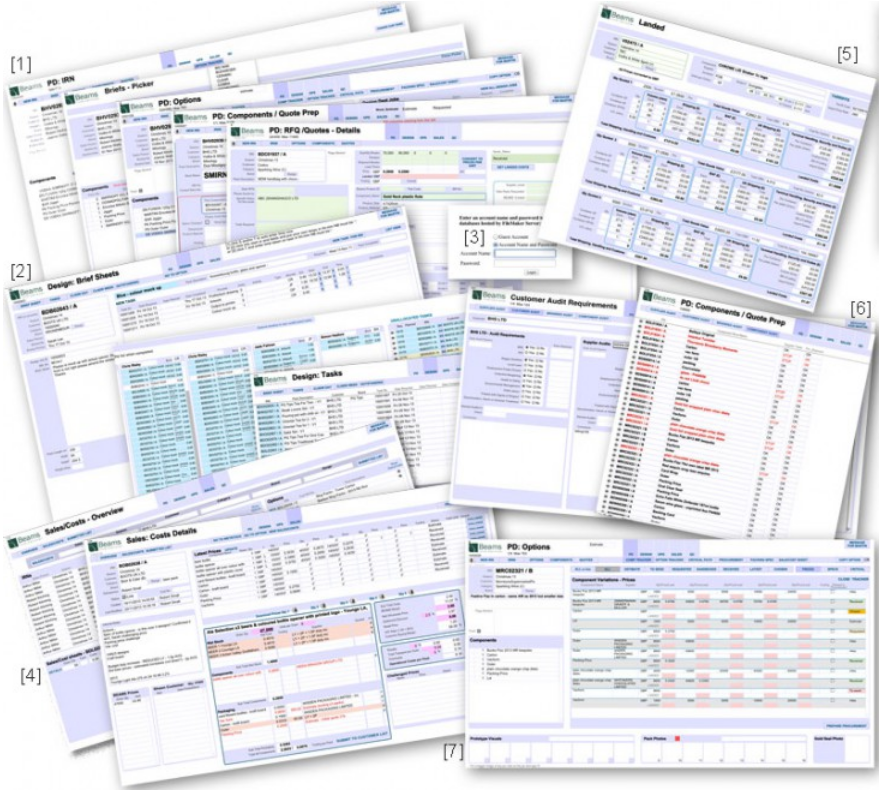
A product development company supplying the major retailers wanted to unify data, avoid duplication and errors and make it available to all in real time. It replaced numerous spreadsheets, a couple of off-the-shelf-apps and an access databases that had been developed over time by a number of individual members of staff to be able to do odd daily tasks. It grew to be the biggest project I’d worked on, during the process I taught the Ops Manager, who then took over it’s development to produce reports etc.
[1] The product development was where it all started. A team of half a dozen would come up with themed gift ideas, often based around the food & drinks market. Ideas you would buy at Easter, Christmas, valentines, back to school etc. Nice, interesting packaging etc.
A series of screens walked through the logistics of product development. Building up new pack ideas by combining existing components and/or specifying new ones. There were ‘briefs’ (Easter ,20), ‘options’ (bunny mug and chocolates, bottle of Guinness and a FA cup guide…), ‘variations’ (printed bunny mug, relief bunny mug, 6 or 10 chocolates…) and components (mug, chocs, printed leaflet, inner packing, plastic tray, outer card box, ribbon, printed cardboard outer…)
Requests for artwork/samples from the design department were generated here.
When the ‘components’ became detailed enough (and only then) could a quote be requested.
[2] Those design briefs then appear in the Design Department’s ‘in tray’. Jobs are able to be allocated to various members of the design team. Individuals log in to see their list of jobs and record their times.
[3] Requests for quotes (RFQs) are collated. Before, RFQs came in many formats from the product developers. Verbal, bits of paper, Word docs, various Excel spreadsheet. Often, not enough info was given, the buyer had to wade through every detail and make sense of what was being asked. She then asked for 3 quotes for each component.
The quotes that came back were also in many formats. Emails, attached Word or Excel docs, even links to the suppliers web site. They more often than not did not quote for exactly what was asked. A mm or two out in one component could mean that the item didn’t fit.
Keeping tabs on all this info coming and going was a Herculean task.
[4] One crucial needed gate keeper was a standard RFQ component form. This could not be passed to the buyer till all the necessary info was there. Part of the form were pre defined drop-down-lists describing the component. Packaging could be described as paper, card or corrugated; printing could be one, many or full colour etc.
Describing a component this way meant that the buyer finally didn’t have to read every word of every RFQ and make human decisions. Now she worked with one master list of component records which…
- found all new RFQs
- sorted by type
- she then had to select the first category ie all ‘full colour printed bits on paper’.
- send auto email of RFQ to their 3 preferred suppliers. To get to this point the buyer’s work load had been reduced from hours to seconds.
- if the supplier didn’t have a login an account was auto created and an email sent saying that a new user account had been set up with url, username and password details. A prompt appeared telling the buyer that a new account had been created for… showing name, phone and company asking her to phone that person to tell them to expect that email, which might have gone in their spam, and they should have also received a RFQ. Please could they follow that link for the specs etc.
[5] The second crucial gate keeper was only allowing quotes to be submitted via their online portal.
- suppliers would click on the url link in the RFQ email. After entering username and password they saw a list of all RFQs sent to them. Sorted by when sent and when returned.
- clicking on one would take them to all the spec. The crucial bit was that non of these fields were editable, so they couldn’t change 150mm to 148 or full colour to 5 colour, which again saved the buyer hours.
- There were documents that could be seen and downloaded, photos, pdfs, tech drawings etc.
- There were only allowed to enter info in certain fields: currency, prices for the various quantities, box size and a comments field then click submit.
- All the buyer had to do was see the new quotes and read the comments box. If the comments suggested they could supply exactly then it was sent back to product development for their comments.
- If necessary, the price might be converted from USD FOB China to GBP DDP ( see the detailed example of FOB-DDP), and then auto logged against the component which updated the total price for that ‘option’.
[6] From this plethora of info the latest/best prices are automatically pulled through for the sales department and flagged. A complex script runs looping through all the quotes selecting chosen over latest over estimate etc and presenting a summary of the latest best prices. Staff are able to set various scenarios based upon real time info.
[6] The Quality Control Dept monitors customer audit requirements and which suppliers comply. They also add safety testing requirements to individual products. This automatically allows a report to flag when situations do not comply will all necessary tests and regulations.
[7] When orders are placed critical paths are created.
[8] Numerous ‘trackers’ follow the development and pricing of the packs through procurement of orders to delivery to the client. Allowing staff to immediately sense where/when bottle necks and potential issues might arise.